Sonasi Notebook
Drop in PDFs, Office files, web pages and recordings. Search by meaning, ask questions, get answers with the page they came from. Your library stays on your Mac. A NotebookLM alternative.
Overview
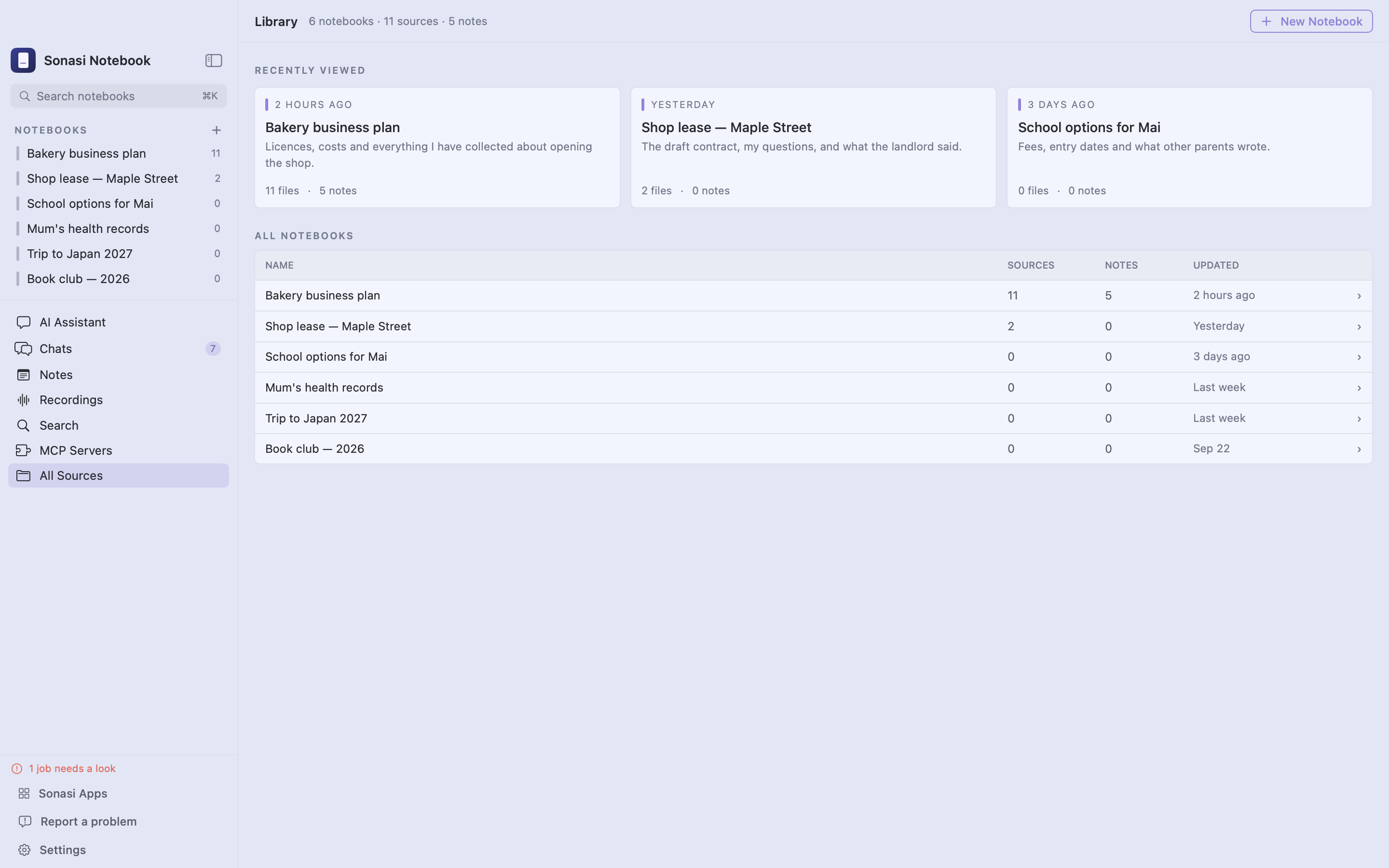
Sonasi Notebook is a research notebook for one topic at a time — a contract, a course, a project, a health question. Put the files about it in a notebook and the app reads them for you: it finds the passage you half-remember, answers questions with citations, and writes summaries you can turn into notes. When you want it to, it also reaches past your files — into the tools you connect and the chats you answer.
YOUR LIBRARY STAYS ON YOUR MAC Files, notes, summaries and the search index live in one folder on your Mac. Reading, transcribing and indexing run on Apple silicon. Text leaves your Mac only where you send it — to an AI account you connect, an MCP server you add, or a chat you reply to — and then only what that step needs.
WORKS WITHOUT AN ACCOUNT Download an on-device model and chat with your files offline. Prefer a hosted model? Add your own OpenAI, Anthropic or Google account, or point the app at any OpenAI-compatible server you run, such as Ollama. Keys go to the Keychain, never to us.
READS ALMOST ANYTHING
- PDF, including scanned pages (on-device OCR in Vietnamese, Japanese, English and more)
- Word, PowerPoint and Excel — with the original layout when Office or iWork is installed
- Images, with their text recognised on your Mac
- Web pages, including JavaScript-heavy ones, and YouTube captions
- Audio and video, transcribed on your Mac
- Markdown and plain text
- Apple Notes folders — import once, or keep following them
- Folders in Google Drive, Dropbox and OneDrive — follow one and new files come in by themselves
- Recordings and transcripts from Sonasi Meetings, through Sonasi Link
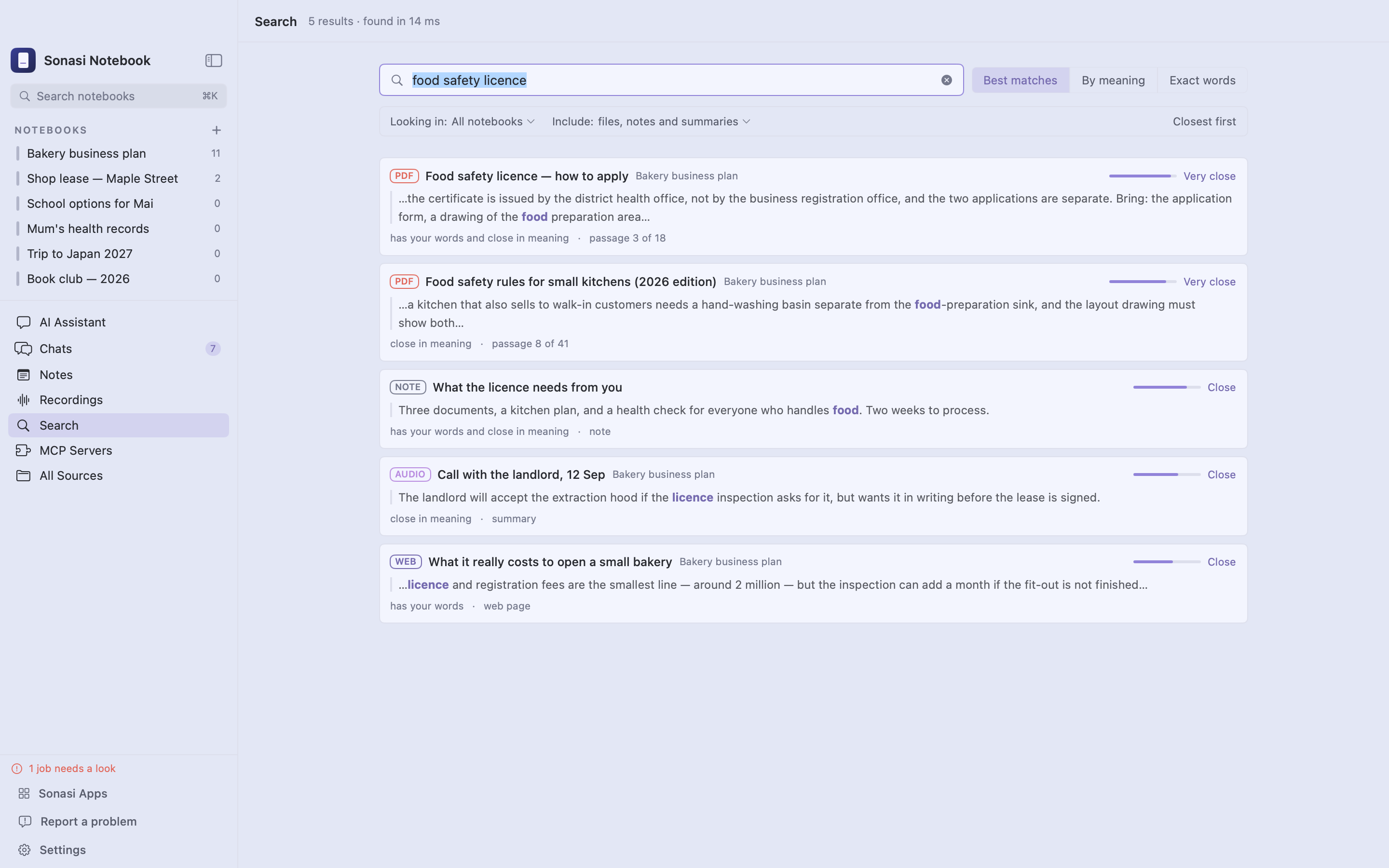
FIND BY MEANING, NOT JUST BY WORDS Type what you remember and get the passage even when the wording differs. Vietnamese, Japanese, Chinese, Korean and English side by side, with diacritics respected.
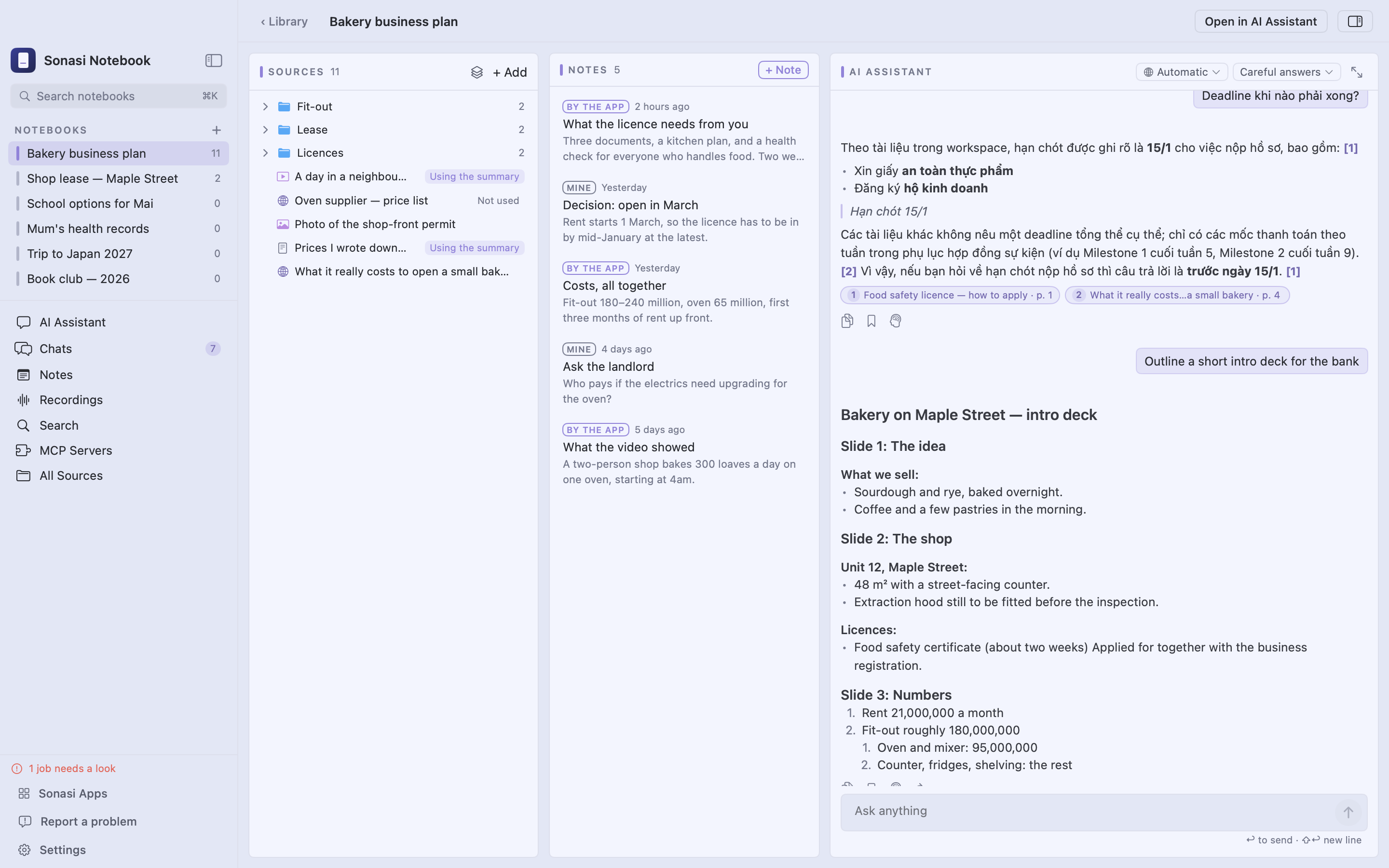
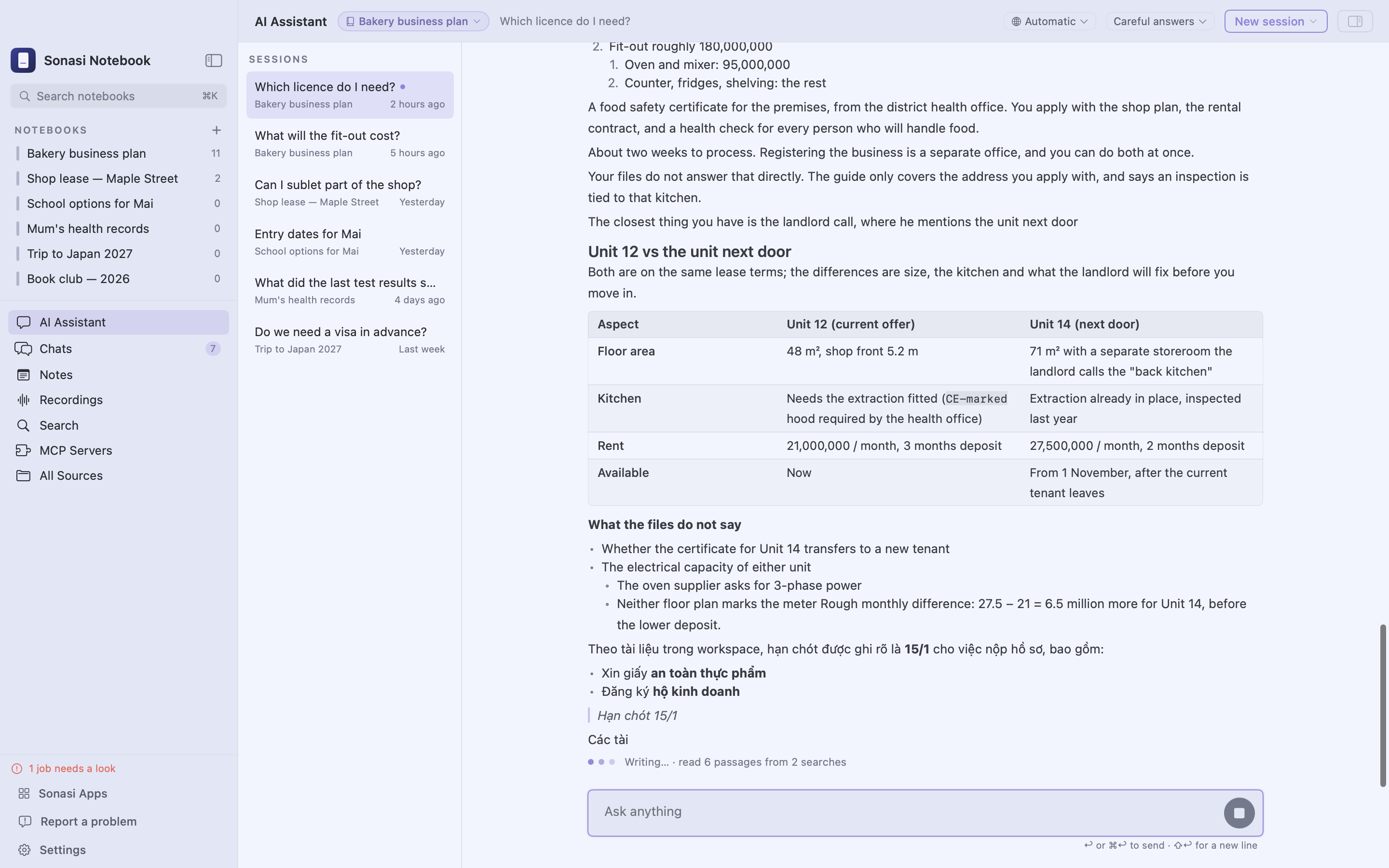
ASK, AND SEE WHERE THE ANSWER CAME FROM Quick answers reply from the files you selected. Careful answers plan a search, read the passages, and cite every file and page they used — click a citation to open the file at that spot. Long conversations keep their thread: older messages are condensed, not forgotten. Each notebook keeps a short list of things to remember from one conversation to the next, and you see and edit every line.
CONNECT YOUR TOOLS Add MCP servers — your CRM, your task tracker, or a server running on your own Mac — and the assistant can look things up and get things done there. You decide, server by server, whether it asks before changing anything, and every tool call it made is listed under the answer.
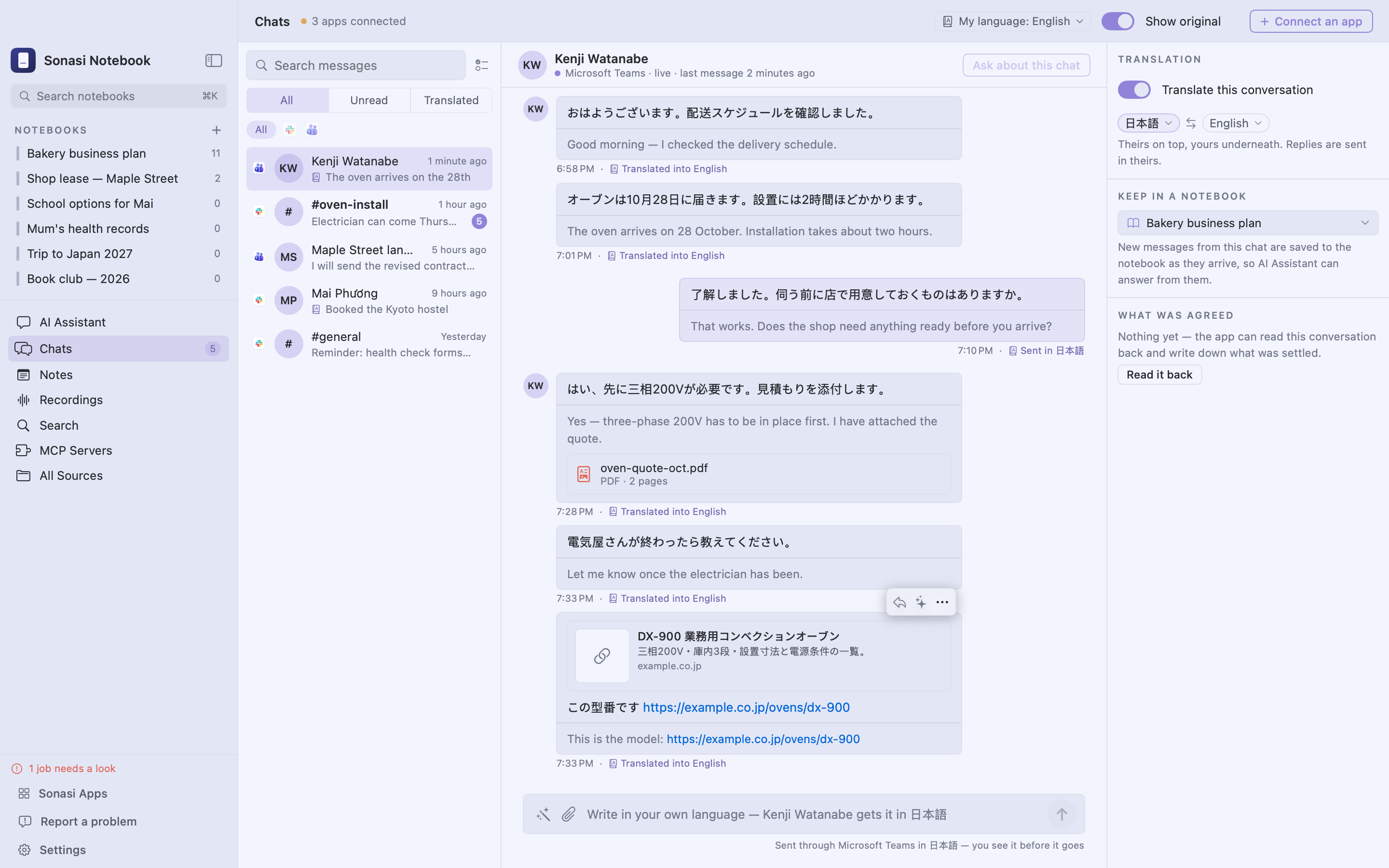
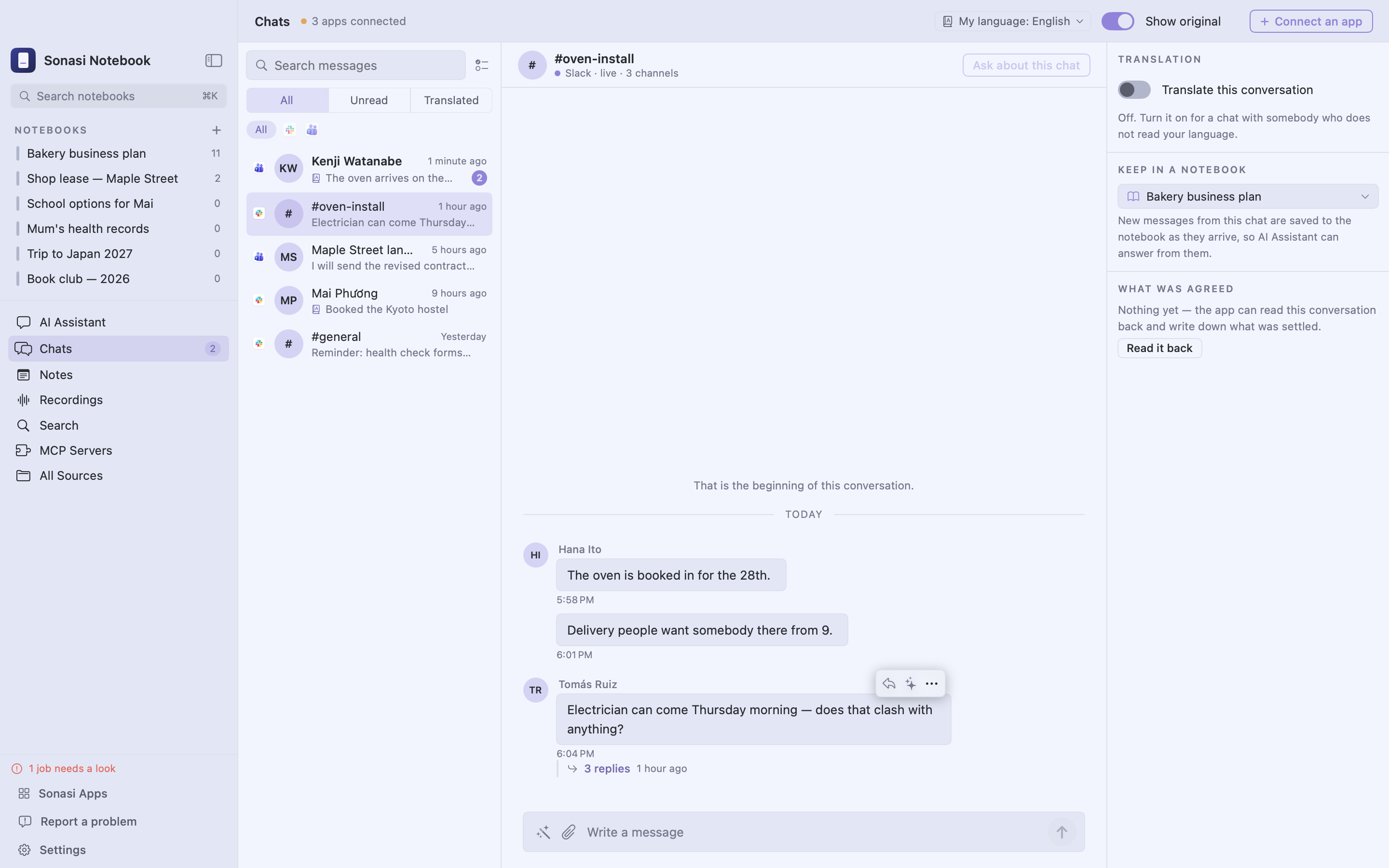
ANSWER YOUR CHATS Connect Slack or Microsoft Teams and read your conversations next to your notebooks. Ask the assistant about a message and get a reply in plain, ready-to-send words. Nothing goes out until you press Send, and then it goes out as you. Pin the conversations you keep coming back to. Turn on translation for a conversation to read it in your language while your replies go out in theirs — shown to you before they are sent.
YOUR DAY ON ONE PAGE The Dashboard reads like a morning paper: what was said in the chats you follow, what your meetings settled and what your notes added, each story opening where it was said. Pick a day to read an earlier issue. Each chat also keeps a short list of what was agreed in it, and the dates that came up show under Upcoming. It is written by AI, and says so — check it before you decide anything.
TASKS THAT FIND THEMSELVES A to-do list in the style of Microsoft To Do: My Day, Important, Planned, Assigned to me, Waiting on others, and a list for each person and each chat. Turn on Create tasks with AI and it reads the tasks out of your chats, notes and meetings — who is to do what, by when — without adding the same one twice, and ticks a task when it reads that it is done, showing what it read with Undo beside it. Your own tasks with a date remind you on your Mac; for someone else's, the AI drafts a reminder the way you write to them, and you send it.
ANSWERS IN YOUR LANGUAGE Ask in any language and the answer comes back in it — or fix the answer language per notebook chat, from 70+ languages. On-device models are kept from drifting into another script.
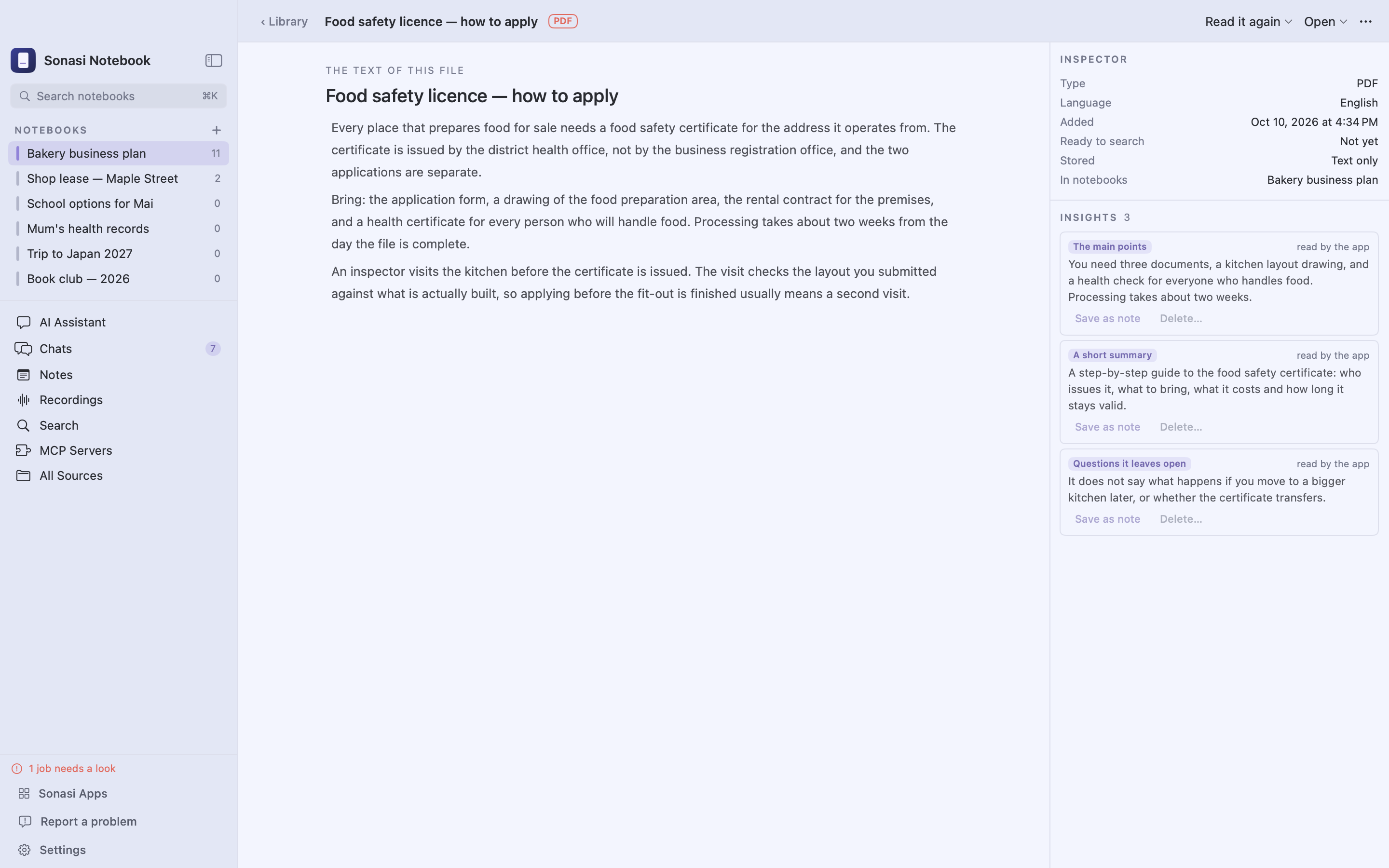
YOUR NOTES, YOUR WORDS Write notes in Markdown, save an answer or a summary as a note, and use notes as context for the next question. Automatic "read it for me" summaries, key points and open questions for every file you add — or turn them off. Export a whole notebook as a folder whenever you like.
BUILT FOR THE MAC It looks and feels like the rest of your Mac, in light or dark, with eight accent colours to choose from. Use it in English, Vietnamese, Japanese, Korean, Simplified or Traditional Chinese, or Thai. Back up everything to a single file from Settings. Nothing to set up, no account to create with us, and anonymous usage statistics are sent only if you say yes.
REQUIREMENTS macOS 26 or later on a Mac with Apple silicon. On-device models download on first use: about 0.6 GB for search, and 1.8 or 4.3 GB for the recommended chat model, depending on your Mac's memory. Hosted AI features need your own account with that provider; usage is billed by them, not by us.
Features
Notebooks, not folders
Group a subject's files, notes and chat sessions in one place. The same file can sit in several notebooks.
Answers with sources
Ask in plain words. Every answer names the file and page it came from, so you can check it.
On-device by default
Your Mac reads, transcribes and searches the files. Nothing is sent anywhere unless you connect a service, and it works offline.
Reads what you have
PDFs including scans, Office files, images, web pages, YouTube, recordings, Apple Notes, cloud folders and Sonasi Meetings.
Search that understands
Find by meaning, by exact words, or both at once — across one notebook or everything.
Summaries written for you
Each new file can come back with its main points, a short summary, open questions, or your own instruction.
Your tools, through MCP
Connect MCP servers and the assistant can look things up and act in them — asking first when you want it to.
Chats, answered
Read Slack and Teams beside your notebooks, translated if you like. Ask about a message, get a reply ready to send, and send it yourself.
Your day on one page
A morning briefing from your chats, meetings and notes, every story linked to where it was said. Earlier issues stay a click away.
Tasks that find themselves
Turn it on and the AI reads tasks out of chats, notes and meetings — who, what, by when — and ticks them when they are done, with Undo.
Your choice of model
On-device, Anthropic, OpenAI, Google, or anything OpenAI-compatible including your own server. Keys live in the Keychain.
Data you can carry
One folder holds your files, notes and index. Back it up to a single file from Settings.
Requirements
- Operating system
- macOS 26 or later
- Processor
- Apple silicon (M1 or later)
- Memory
- 8 GB; 16 GB recommended for on-device chat
- Space
- Room for your files, plus 0.6–5 GB if you use on-device models
- Account
- None required — optional for cloud models, chat apps and MCP servers
- Interface languages
- English, Vietnamese, Japanese, Korean, Simplified and Traditional Chinese, Thai
What's new
- First release.
- • Notebooks that read PDF, Word, PowerPoint, Excel, images, web pages, YouTube captions, recordings and Apple Notes
- • Follow folders in Google Drive, Dropbox and OneDrive
- • Recordings from Sonasi Meetings, through Sonasi Link
- • Search by meaning across Vietnamese, Japanese, Chinese, Korean and English
- • Quick and Careful answers with citations — on-device or with your own AI account
- • MCP servers: the assistant uses your tools, and asks before changing anything when you want it to
- • Slack and Microsoft Teams: read your chats, ask about a message, send a reply the assistant drafted
- • Notes in Markdown, automatic summaries, and a memory for each notebook
- • Seven interface languages; everything kept on your Mac
Questions
Does it need an internet connection?
No. Adding files, reading them, recognising text on scanned pages and images, turning recordings into text and searching all happen on your Mac. You only need a connection for what you choose to connect: a cloud AI account, an MCP server, a chat app or a cloud folder.
Where do my files go?
The original stays where it was, and a copy goes into one folder on your Mac, next to the notes and the search index. Settings › Your data shows where. Nothing is uploaded unless you pick a cloud AI account, and then only the text a question needs.
Can I use a local model or my own server?
Yes. Download one of the on-device models in Settings, or choose "Something else" when adding an account, give it an address such as http://localhost:11434/v1 and type the model names — anything that speaks the OpenAI format works.
How do I back up?
Settings › Your data › Back up now… writes everything — your files, notes and what the app has written — into one zip. Downloaded models are left out, because the app fetches them again by itself. To move to a new Mac, copy the folder shown there.
Which languages does it handle?
Vietnamese, Japanese, Korean, Chinese and English documents are handled without settings; diacritics and tone marks are kept in the index rather than folded away, which is what makes accented search reliable. The interface is in English, Vietnamese, Japanese, Korean, Simplified and Traditional Chinese, and Thai.
Can I trust the answers?
Every answer carries the file and page it came from, and you decide which files are used — all of a file, only its summary, or none of it. When the assistant calls a tool, each call is listed under the answer.
What can the assistant do with MCP servers?
Whatever tools the server offers: look up a customer, add a task, search a database. You choose for each server whether it asks before changing anything. Servers are reached over HTTP; a command-line server has to be started by you, and the app is given its address.
Will it send chat messages on its own?
No. The assistant writes a reply, or a reminder about a task; it goes out only when you press Send, under your own name.
Can the AI get it wrong?
Yes. Answers name the file and page they came from so you can check them. The Dashboard says it is written by AI, and a task the AI ticked shows what it read, with Undo beside it. Read what the AI wrote before you decide or send anything.
Does the app collect anything about me?
Only if you agree. The app asks once whether to send anonymous usage statistics — that it was opened, its version, which features are used — through TelemetryDeck in Germany. Nothing you wrote, no names, no accounts. Change your answer any time in Settings › General.
What is Sonasi Link?
If Sonasi Meetings is on the same Mac, its recordings and their transcripts show up as sources you can add to a notebook — nothing to export or copy by hand.